
How To Get Started With SmileShare
Step 1:
Create An Online Account
A registered DynaFlex login is required to access DynaFusion. If you do not have an account, click the button below to fill out the necessary information. We will verify your account and send access instructions.
Step 2:
Patient Diagnostic Records
Use any open source intraloral scanner to take extremely precise and high-resolution digital patient impressions. Upload your digital impressions through DynaFusion or directly from the scanner.
Step 3:
Submission & Design Setup
Create a patient, upload digital files, and submit an online prescription. Once the necessary records are loaded, a suggested SmileShare™ Aligner setup is processed.
Step 4:
Digital Treatment Review
A digital treatment solution is created and made available for doctor review. With the use of DynaFusion, you can review, modify and approve the case.
Step 5:
Fabrication
Once approved, 3D models are printed and the aligners are fabricated and checked for quality and fit. Each aligner is marked by state-of-the-art laser marking system with the case number and aligner identification.
Step 6:
Final Delivery
The appliance(s) will be shipped directly to your office in our large SmileShare™ box (shown below). Each aligner set is packaged in clearly marked pouches. Each pouch shows patient, office, and aligner info. Other contents are listed below.
For hands on treatment planning, please download the following software.
Popular Scanners Used
DynaFlex can accept scans taken through any intraoral scanner. The scanners pictured below are our most popular scanners that doctors use to send cases. The information listed with each scanner indicated how you will submit your scan and prescription to DynaFlex.
Important Note: DynaFlex can accept .stl files from ANY scanner. If your scanner is not listed, call 1-800-489-4020 or request assistance via form.
When scanning your patient, always keep in mind the desired appliance, visualizing areas that will be incorporated in its fabrication and use. This will ensure a proper turnaround time and accuracy in the fabricated appliance. Please download this quick reference guide for our scanning requirements.
If you have questions, please call 800-489-4020…we are here to help!
After a patient’s scan has been submitted to DynaFlex, a digital Rx on DynaFusion must be completed.

Align iTero Ver. 5.2 or higher
Select DynaFlex in Dropdown
In order to have DynaFlex as an option, call iTero Support (800) 577.8767 and have them add DynaFlex Lab ID 10887. Select DynaFlex when submitting an iRecord.

3Shape/Trios
Select DynaFlex in Dropdown
Add [email protected] to your scanners Lab Connections. Once your request is approved by DynaFlex, you can begin sending scans.

CareStream CS 3500
Exports Models to Portal
Rx included with export
After a case is scanned, select [email protected] as the destination for the case.
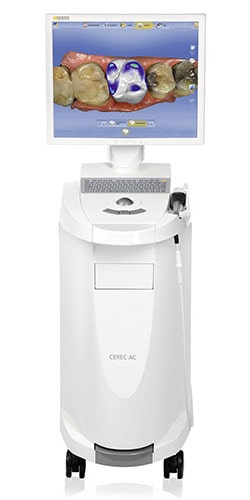
Sirona/Cerec
Select DynaFlex in Dropdown
Find DynaFlex listed under “Ortho Labs”. Location Lake St. Louis. Select DynaFlex as the destination when scanning.

MEDIT i700
Exports Models to Portal
Log into the Medit Link platform. Search for DynaFlex under Partners. Connect and choose DynaFlex as your scan destination.
Our Team Is Here To Help
We’re proud to have a team of highly skilled and trained professionals dedicated to helping you create beautiful smiles. Whether you’re looking for a simple adjustment or a comprehensive treatment, we’re here to provide support, answers, and a clear path to success. You may also schedule a meeting with our Senior Aligner Consultant to learn more about how SmileShare can best serve your practice’s needs.
For further inquiries, reach out to our SmileShare™ Senior Aligner Consultant, Sarah Habig.
Sarah specializes in helping orthodontic practices get started with SmileShare Clear Aligners, making her a vital asset to your practice from day one. With an impressive career spanning over two decades in the orthodontic field, Sarah’s journey is a testament to her passion and expertise in SmileShare Clear Aligners. She embarked on this path in 2003, initially joining the St. Louis Orthodontic Group under Dr. Richard Goldberg. Her roles have been as diverse as her skills, from chairside orthodontic assistant to new patient coordinator and insurance coordinator, showcasing her versatility and dedication to patient care.
Sarah’s credentials include certifications in Dental Assisting (CDA) and Expanded Functions Orthodontic Dental Assistant (EFODA), underscoring her commitment to excellence in her field. Her career trajectory took her from working with Dr. Goldberg to expanding her horizons with Dr. Robert Shapiro at Orthodontic Specialists of St. Louis, before eventually returning to Dr. Goldberg’s team. Each role she’s undertaken has been fueled by her passion for orthodontics and her desire to make a significant impact on patients’ lives.

 (314) 712-9194
 Schedule Virtual Meeting

